







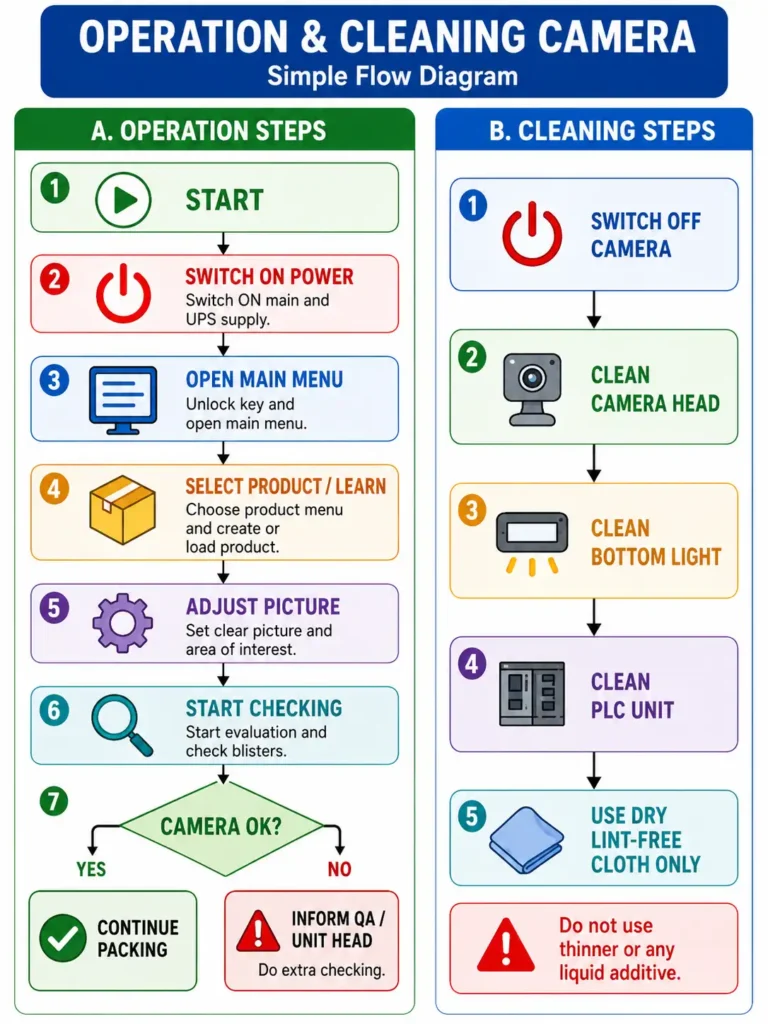
This SOP explains the correct method for operating and cleaning the camera system installed on a blister packing machine. The camera is used to check blister packs and help identify incorrect, missing, damaged, or unwanted objects during packing. The procedure describes how to switch on the system, create and save a new product format, adjust the image, select the area of interest, detect objects, set colour, area, shape, and position tolerances, and start evaluation. It also explains how to check the camera performance before routine packing. If the camera fails, the packing line can continue only after approval from the Unit Head and Quality Assurance, with additional checking of packed blisters. For cleaning, the camera system should be switched off and the camera head, bottom light, and PLC unit should be gently cleaned using a clean, dry, lint-free cloth. No thinner or additive should be used to prevent equipment damage.
Impact Assessment
The camera system on the blister packing machine plays an important role in checking product quality during packing. It helps identify missing, damaged, incorrect, or unwanted items in blister packs. Correct camera setting, image adjustment, product selection, and tolerance setting help reduce packing errors and product rejection. If the camera is not working properly, defective blisters may pass unnoticed, which can affect product quality and patient safety. The SOP also requires approval from the Unit Head and Quality Assurance before running the line without the camera, along with extra checking of packed blisters. Proper cleaning of the camera head, bottom light, and PLC unit helps maintain clear images and smooth performance. Using a clean, dry, lint-free cloth protects the equipment from damage. Following this SOP improves inspection accuracy, prevents mix-ups, supports GMP compliance, reduces rework, and ensures that only properly packed blister products are released for further processing and distribution.
Questions & Answers – Operation and Cleaning of Camera
Q1. What is the purpose of the camera on the blister packing machine?
Answer: The camera is used to inspect blister packs and help identify incorrect, missing, damaged, or unwanted products during packing.
Q2. Who is responsible for operating and handling the camera system?
Answer: Packing staff and Engineering staff are responsible for the camera system.
Q3. What should be done before creating a new product program?
Answer: Switch ON the main supply and UPS supply, open the main menu, and prepare the camera system for loading the new program.
Q4. Why is the Area of Interest selected?
Answer: The Area of Interest defines the part of the blister image that the camera will inspect during evaluation.
Q5. What should be done after saving a product setting?
Answer: Load the saved product, start evaluation, run the machine, and check that the camera is working properly.
Q6. What should be done if the camera fails during packing?
Answer: Inform the Unit Head and Quality Assurance, obtain approval before continuing packing, use an additional checker, and arrange repair of the faulty camera.
Q7. How should the camera head be cleaned?
Answer: Switch OFF the camera system and gently clean the camera head using a clean, dry, lint-free cloth.
Q8. Can thinner or cleaning additives be used on the camera?
Answer: No. Thinner or additives should not be used, especially for cleaning the bottom light.