







1. Brief Description:
This SOP describes the procedure for performance verification of calculators and validation of Excel sheets used for calculations within the Quality Assurance Department. Its purpose is to ensure that calculation tools provide accurate, reliable, and reproducible results before routine use. For calculators, verification includes basic mathematical functions such as addition, subtraction, multiplication, division, percentage, square root, logarithm, and antilogarithm. Each calculator is assigned an identification number, and satisfactory or unsatisfactory results are documented in the specified records. Excel sheets are validated for mathematical calculations including addition, subtraction, multiplication, division, percentage, square root, and %RSD calculations. Unsatisfactory calculators or Excel sheets are rejected from use.
Skip to PDF content2. Flow Diagram:
The flow diagram illustrates the systematic procedure for Performance Verification of Calculator and Excel Sheet before their use for official pharmaceutical calculations. The process begins with identification of a new calculator or Excel sheet, followed by verification or validation to confirm calculation accuracy. For a calculator, key functions such as addition, subtraction, multiplication, division, percentage, square root, logarithm, and antilogarithm are verified and documented in Annexure-I. Satisfactory calculators are identified, issued, and controlled through Annexure-II, while unsatisfactory calculators are rejected.
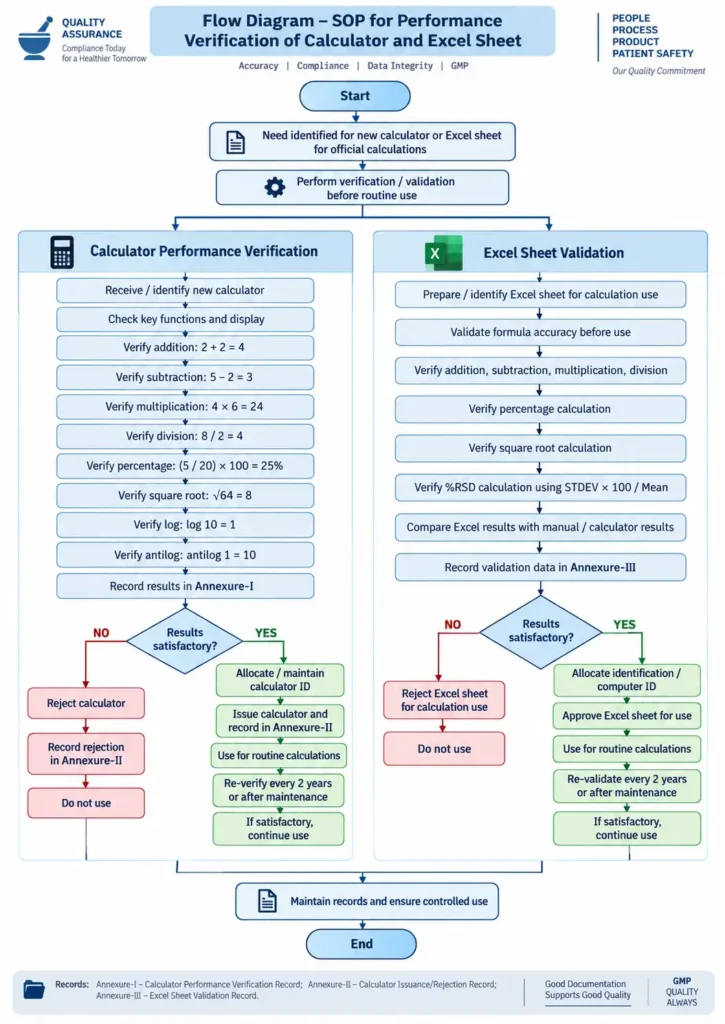
For an Excel sheet, mathematical formulas including basic calculations, percentage, square root, and %RSD are validated and recorded in Annexure-III. Unsatisfactory sheets are rejected from calculation use. Both calculators and Excel sheets require re-performance verification every two years and after maintenance, ensuring continued accuracy, data integrity, and controlled use.
3. Brainstorming:
The brainstorming analysis identifies potential reasons why the SOP for Performance Verification of Calculator and Excel Sheet may not be implemented effectively. The central issue is linked to possible gaps such as inadequate personnel training, poor SOP awareness, unclear responsibility allocation, weak management follow-up, workload pressure, insufficient verification planning, and lack of controlled calculation tools. Particular attention is given to documentation and identification controls, including failure to assign calculator/computer identification numbers and maintain the required Calculator Performance Verification, Issuance/Rejection, and Excel Sheet Validation records. The SOP itself requires these records and specifies periodic re-verification after two years and following maintenance.
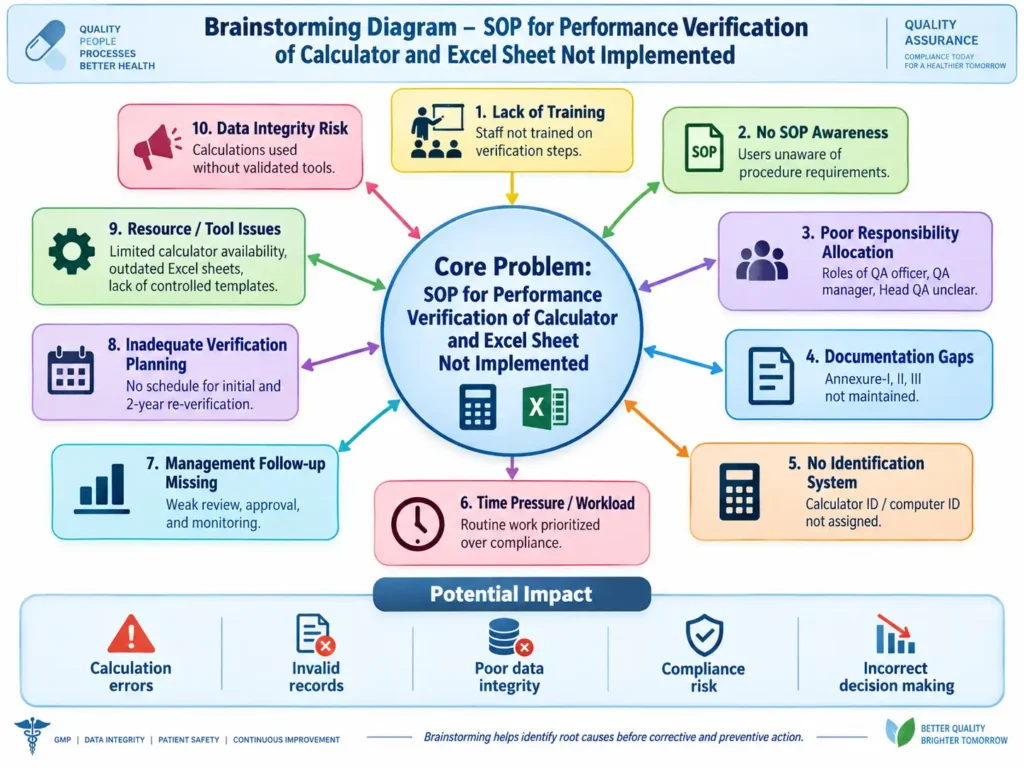
These brainstorming points represent possible contributing causes rather than confirmed root causes. If such weaknesses occur, they may increase the risk of calculation errors, unreliable records, poor data integrity, GMP compliance concerns, and incorrect quality-related decisions.
4. 5 Why Analysis:
The 5 Why Analysis evaluates why the SOP for Performance Verification of Calculator and Excel Sheet may not be implemented effectively. The analysis begins with inconsistent execution of verification and validation activities and progressively examines deeper contributing factors. The likely causes include inadequate staff training and SOP awareness, unclear responsibilities among QA personnel, weak control of calculator identification and Excel sheet validation records, absence of systematic re-verification scheduling, and insufficient management oversight. The SOP itself assigns responsibilities to QA Officer/Executive, QA Manager, and Head QA, and requires documented performance verification, validation records, and periodic re-verification.
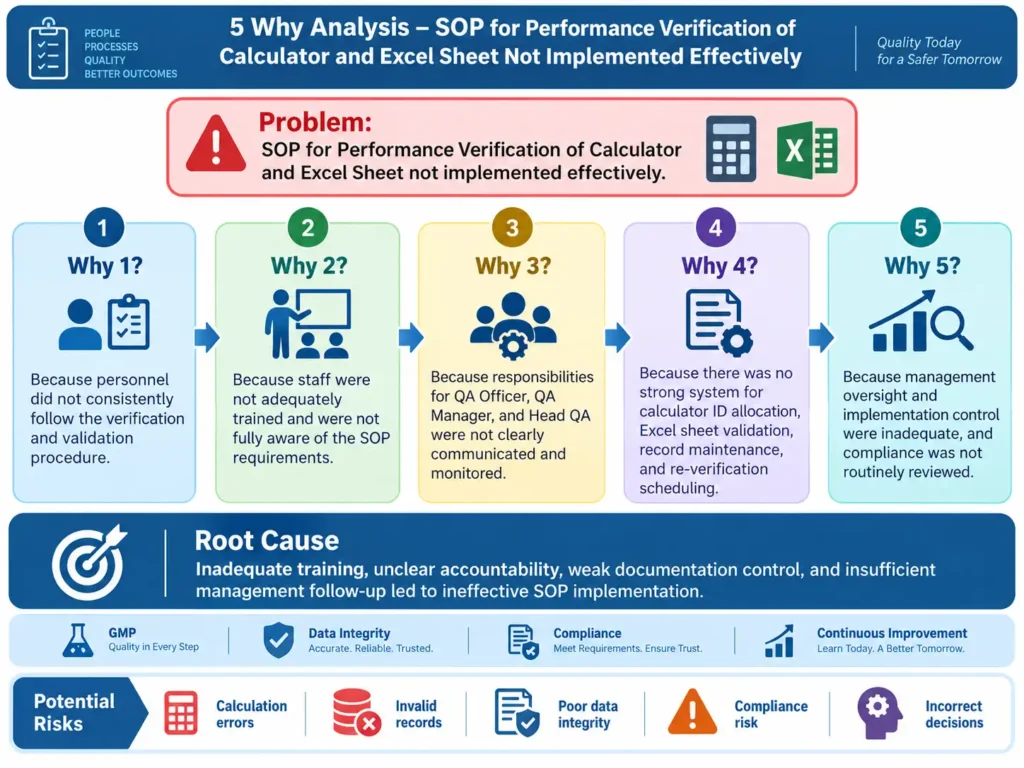
The analysis concludes that the probable root cause is a combination of training gaps, unclear accountability, inadequate documentation control, and weak management follow-up. Such deficiencies may increase the risk of calculation errors, unreliable records, data-integrity concerns, and GMP compliance issues.
5. Heat Map Analysis:
The Heat Map Analysis evaluates the potential risks associated with ineffective implementation of the SOP for Performance Verification of Calculator and Excel Sheet. The assessment considers two main dimensions: likelihood of occurrence and impact on quality, data integrity, and GMP compliance. The highest-priority risks are associated with lack of training, documentation gaps, and weak management oversight, because these factors can directly affect the reliability and control of calculation tools. Other significant risks include poor SOP awareness, unclear responsibilities, absence of calculator/computer identification controls, and missing re-verification planning. The SOP requires defined QA responsibilities, documented verification/validation records, and periodic re-verification, making these controls important to effective implementation.
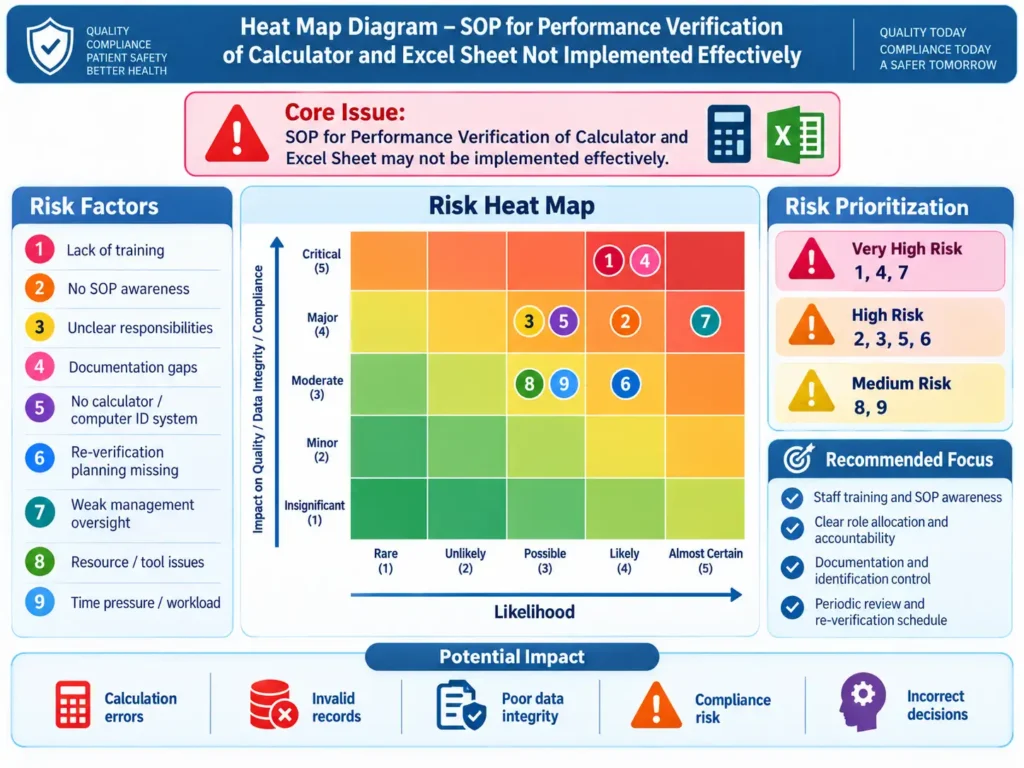
The heat map therefore helps prioritize corrective actions toward training, accountability, documentation control, identification systems, and periodic review. The displayed risk rankings are a qualitative prioritization for investigation and should be confirmed through the site’s approved risk-management methodology.
6. Impact Assessment:
The SOP establishes controls to ensure that calculators and Excel sheets used for official calculations are verified/validated before use, assigned appropriate identification, documented, and periodically re-verified.
| Impact Area | Assessment | Potential Impact if SOP Is Not Implemented |
|---|---|---|
| Calculation Accuracy | Calculator functions such as addition, subtraction, multiplication, division, percentage, square root, log and antilog are verified. | Incorrect calculations may remain undetected. |
| Excel Formula Reliability | Excel calculations including arithmetic functions, percentage, square root and %RSD are validated before use. | Formula errors or incorrect spreadsheet calculations may be used for official results. |
| Data Integrity | Verification and validation records provide evidence that calculation tools were checked and found satisfactory before use. | Reduced confidence in calculated data and inability to demonstrate that calculation tools were suitable for use. |
| Traceability | Calculator identification numbers, computer IDs, issuance/rejection records and validation records provide traceability. | Difficulty identifying which calculator or computer/Excel sheet was used for a particular calculation. |
| Documentation Control | Annexure-I, Annexure-II and Annexure-III provide controlled records for verification, issuance/rejection and Excel validation. | Missing or incomplete evidence during internal or external review. |
| Control of Defective Tools | Unsatisfactory calculators and Excel sheets are required to be rejected from calculation use. | Defective calculators or incorrect spreadsheets may continue to be used. |
| Periodic Verification | Re-performance verification is required every two years and after maintenance. | Accuracy deterioration or changes after maintenance may remain undetected. |
| Personnel Responsibility | QA Officer/Executive, QA Manager and Head QA have defined responsibilities for preparation, review, training, authorization and implementation. | Unclear accountability may result in missed verification, training or record maintenance. |
| Operational Impact | Implementation requires initial verification, documentation and periodic review but does not require major equipment or facility modification. | Minor additional QA workload and scheduling effort. |
| Quality-System Impact | Effective implementation strengthens control over calculation tools used within QA activities. | Potential impact on the reliability of QA calculations and decisions where unverified tools are used. |
7. Questions & Answers:
1. What is the objective of this SOP?
The objective is to define the procedure for performance verification of calculators and validation of Excel sheets used in the Quality Assurance Department.
2. Who is responsible for preparation and distribution of this SOP?
The QA Officer/Executive is responsible for preparation, distribution, revision, retrieval, and destruction of the SOP.
3. Who is responsible for review, approval, training, and implementation?
The QA Manager is responsible for review, approval, training, and effective implementation in applicable areas.
4. Who is accountable for authorization of the SOP?
The Head QA is accountable for authorization and for ensuring training and effective implementation.
5. What checks are performed on a calculator?
The calculator is checked for addition, subtraction, multiplication, division, percentage, square root, logarithm, and antilogarithm.
6. Where is calculator performance verification recorded?
Calculator performance verification is recorded in Annexure-I – Calculator Performance Verification Record.
7. What happens if a calculator passes performance verification?
If the results are satisfactory, an identification number is allocated and maintained, and the calculator may be issued for use.
8. What happens if a calculator fails verification?
An unsatisfactory calculator is rejected, and the rejection is recorded in Annexure-II.
9. How often should calculator re-performance verification be performed?
It should be performed every two years and after each maintenance.
10. What calculations are verified during Excel sheet validation?
Excel validation includes addition, subtraction, multiplication, division, percentage, square root, and %RSD calculations.
11. What formula is specified for %RSD?
The SOP specifies: RSD = S × 100 / Mean, where S represents standard deviation.
12. Where is Excel sheet validation data recorded?
Excel sheet validation data is recorded in Annexure-III – Excel Sheet Validation Record.
13. What action is taken if an Excel sheet fails validation?
If the Excel sheet gives unsatisfactory results, it is rejected for calculation use.
14. How often should an Excel sheet be re-verified?
Re-performance verification should be performed every two years and after maintenance.
15. Who generates the computer ID?
The IT Department is responsible for generating the computer ID.
16. What are the three annexures included in the SOP?
They are Annexure-I: Calculator Performance Verification Record, Annexure-II: Calculator Issuance/Rejection Record, and Annexure-III: Excel Sheet Validation Record.
17. What is the acceptance criterion for calculator performance verification?
All results produced by the calculator should match the actual expected result.
18. What is the acceptance criterion for Excel sheet validation?
All results generated by the Excel sheet should match the calculator result.
19. Why is performance verification important?
It confirms that calculators and Excel sheets are producing correct results before they are used for official calculations, supporting reliable documented calculations.
20. What should be done if an already-approved calculator or Excel sheet later gives an incorrect result?
It should be rejected from calculation use, and the applicable records should be maintained.
8. Reference Guidelines:
The uploaded SOP currently lists “References: NA” in Section 10.0. For a stronger GMP basis, the following references are appropriate for performance verification of calculators and validation/control of Excel spreadsheets:
- EU GMP – EudraLex Volume 4, Annex 11: Computerised Systems
Highly relevant for Excel sheets used in GMP activities. Annex 11 requires computerized applications to be validated, applies risk management throughout the system lifecycle, and expects appropriate accuracy checks, documentation, defined responsibilities, and data-integrity controls.
EU GMP Annex 11 – Computerised Systems - 21 CFR Part 11 – Electronic Records; Electronic Signatures
Applicable when an Excel spreadsheet or other electronic record is relied upon to satisfy FDA-regulated record requirements. FDA’s accompanying guidance discusses validation, electronic records, audit trails, record retention and system controls.
21 CFR Part 11 – eCFR
FDA Part 11 Scope and Application Guidance - 21 CFR 211.68 – Automatic, Mechanical and Electronic Equipment
Particularly relevant to the principle of periodically checking electronic/computerized equipment under a written program to assure proper performance and maintaining records of those checks. FDA enforcement examples specifically reference this requirement for computers and electronic equipment.
21 CFR Part 211 – eCFR - FDA – Data Integrity and Compliance With Drug CGMP: Questions and Answers for Industry, 2018
Useful for ensuring that calculations, spreadsheet-derived data, electronic records and related GMP records remain complete, consistent, accurate and reliable.
FDA Data Integrity Guidance - PIC/S PI 041-1 – Good Practices for Data Management and Integrity in Regulated GMP/GDP Environments
Provides expectations for data governance, computerized systems and controls needed to maintain reliable GMP/GDP data. PIC/S states that the guidance is intended primarily for inspectors but is also useful to industry.
PIC/S Publications – PI 041-1 - WHO TRS 1033, Annex 4 – Guideline on Data Integrity, 2021
Relevant for Excel calculations and electronic records because it addresses data governance, training, computerized systems, good documentation practices, data integrity and CAPA.
WHO TRS 1033 Annex 4 – Guideline on Data Integrity - MHRA – GxP Data Integrity Guidance and Definitions, Revision 1, March 2018
Provides expectations for organizations to maintain complete, consistent and accurate GxP data and establish documented, risk-based controls for computerized and manual systems.
MHRA GxP Data Integrity Guidance