







1. Brief Description:
This SOP describes the procedure for controlling user access to the ERP system and reviewing ERP audit trails. Its purpose is to ensure that user IDs, passwords, access privileges, and system activities are properly controlled and authorized. The procedure defines responsibilities for users, executives, managers, auditors, the system administrator, and Head QA. User ID’s are created by the IT department after receiving an approved request, while access privileges are assigned according to departmental recommendations. Passwords must remain confidential and should not be shared. All ERP activities are controlled through an activated and locked audit trail, which is reviewed daily by authorized auditors. The SOP establishes different user-access levels, from basic data entry to administrator rights. Any ERP system change must be controlled through approved change control. User additions, deletions, and privileges are documented for proper traceability and accountability.
Skip to PDF content2. Flow Diagram:
The flow diagram explains the complete process for controlling access to the ERP system and reviewing audit trails. It starts when the user department raises a request for creation, modification, or deletion of a user ID. The IT person verifies the request, creates the user ID, assigns suitable privileges, and provides an initial password. The user then changes the password and keeps it confidential.
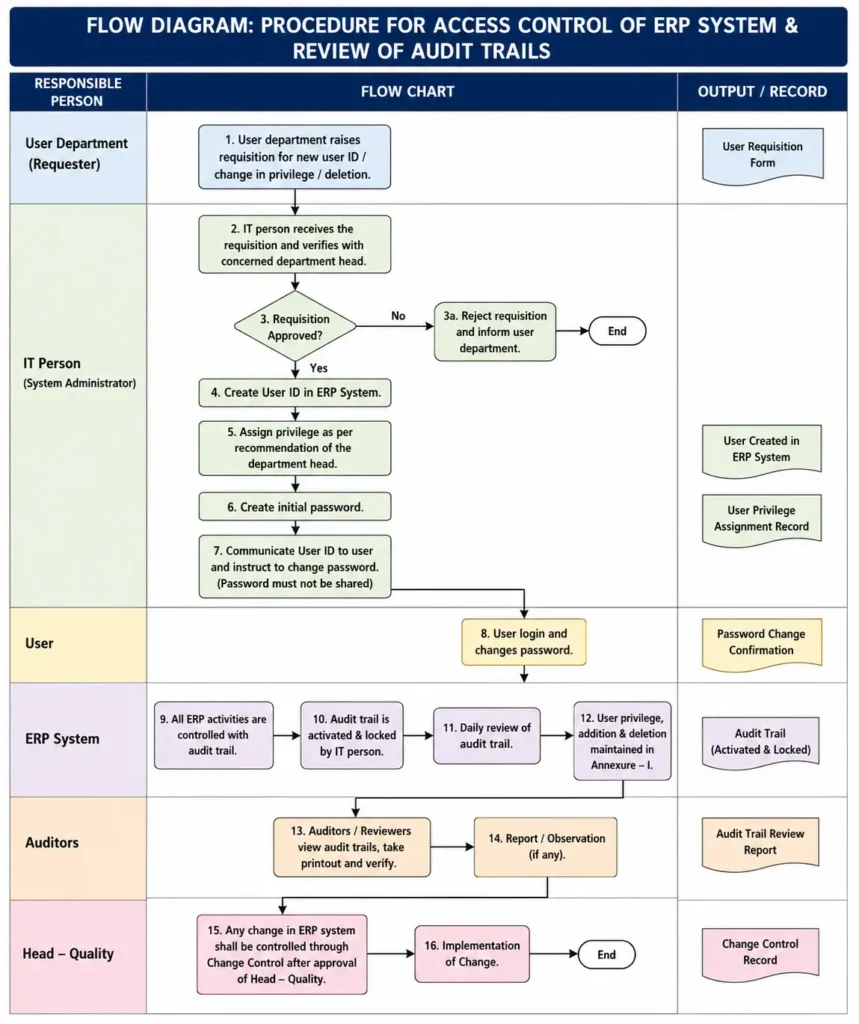
All ERP activities are controlled through an audit trail, which is activated and locked by IT. Authorized auditors review the audit trail daily, verify system activities, and report any observations. User privileges, additions, and deletions are maintained in the designated annexure. Any change to the ERP system is managed through approved change control under Head–Quality authorization, ensuring secure access, traceability, accountability, and data integrity.
3. Brainstorming in Case of SOP Failure:
Brainstorming is a simple investigation technique used to identify possible reasons when the ERP Access Control and Audit Trail Review SOP is not followed correctly. A cross-functional team from IT, QA, user departments, and auditors discusses all possible causes without initially rejecting any idea. The SOP requires controlled creation of user IDs, assignment of privileges, password confidentiality, activation and locking of audit trails, and daily audit-trail review.
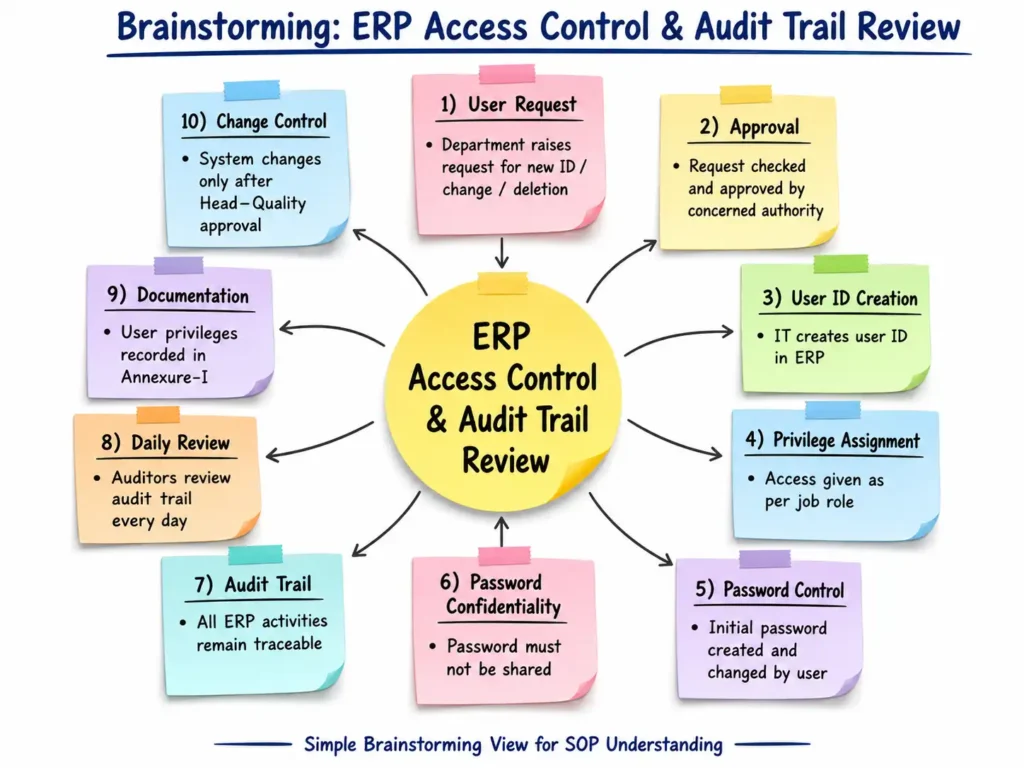
During brainstorming, the team may consider causes such as incorrect user privileges, unauthorized access, password sharing, delayed deletion of user IDs, inactive audit trails, missed daily reviews, incomplete records, inadequate training, IT configuration errors, or changes made without approved change control. The SOP also requires system changes to be controlled through Head–Quality approval. The collected ideas can then be grouped and evaluated to identify the most probable root cause and suitable CAPA.
4. 5-Why Analysis:
The 5-Why Analysis is a simple root cause investigation tool used to understand why an SOP failure occurred. In this case, the problem identified is that the ERP audit trail was not reviewed daily, although the SOP requires daily audit-trail checking by auditors.
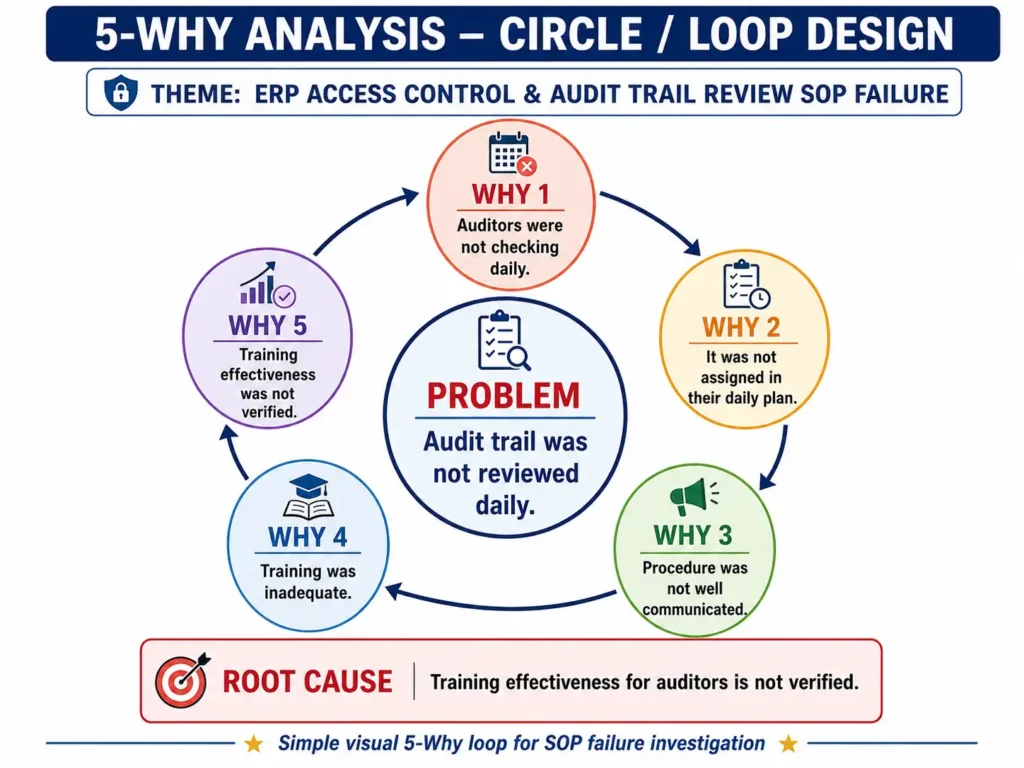
The analysis repeatedly asks “Why?” to move from the visible problem to the underlying cause. The sequence may identify that auditors were not checking daily, the activity was not included in their daily plan, the procedure was not properly communicated, training was inadequate, and training effectiveness was not verified. The final answer becomes the probable root cause. Using the 5-Why method helps the investigation team avoid focusing only on the immediate error. It supports identification of deeper system weaknesses and helps define suitable corrective and preventive actions (CAPA) such as retraining, effectiveness checks, responsibility assignment, and routine monitoring.
5. Fishbone Analysis:
The Fishbone Diagram (Ishikawa Analysis) is a root cause investigation tool used to identify different possible reasons for failure of the ERP Access Control and Audit Trail Review SOP. In this case, the main problem is that the audit trail was not reviewed daily, although the SOP requires daily review by authorized auditors.
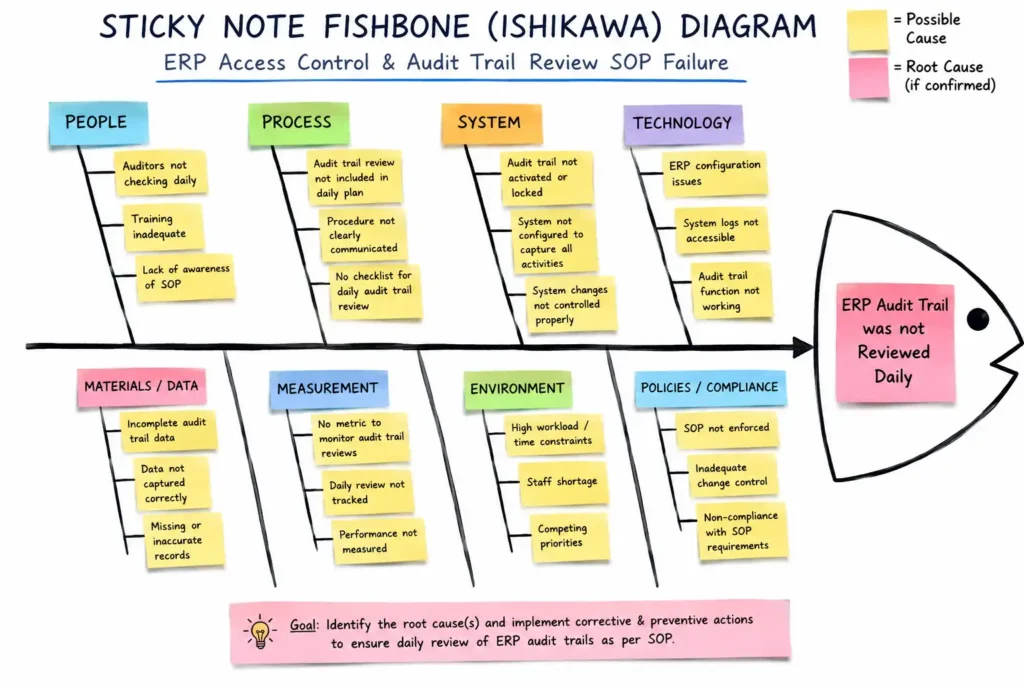
Possible causes are grouped into categories such as People, Method, System, Monitoring, Records, and Management. These may include inadequate auditor training, unclear responsibilities, poor communication of the procedure, missing daily review checklists, audit trail not being activated or locked, incomplete privilege records, lack of monitoring, high workload, and weak supervision. The SOP also requires user privileges to be maintained and ERP changes to be controlled through approved change control. Fishbone analysis helps the investigation team organize all possible causes, identify the most likely root cause, and develop suitable CAPA to prevent recurrence.
6. Heat Map FMEA Analysis:
The Heat Map FMEA is a visual risk assessment tool used to identify and prioritize potential failures in the ERP Access Control and Audit Trail Review SOP. Each failure mode is evaluated using Severity (S), Occurrence (O), and Detection (D), and the Risk Priority Number (RPN) is calculated as S × O × D.
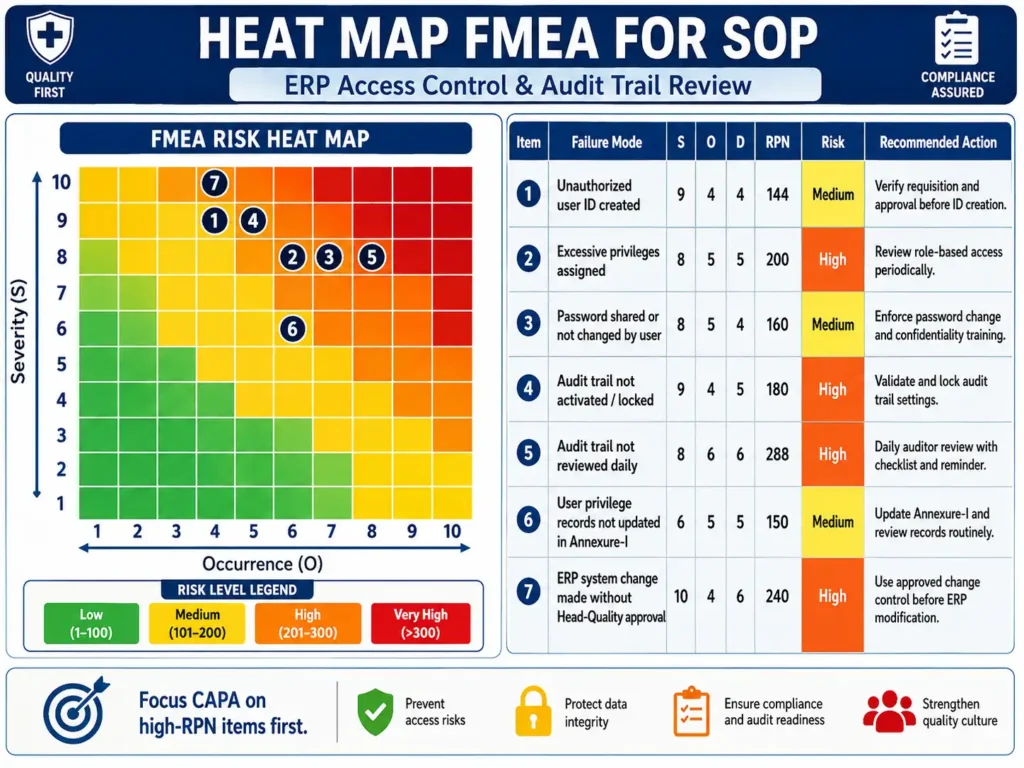
The heat map uses different risk zones to make priorities easy to understand. Green indicates low risk, yellow indicates medium risk, orange indicates high risk, and red indicates very high risk. In this assessment, risks such as excessive user privileges, inactive or unlocked audit trails, missed daily audit-trail review, and uncontrolled ERP changes require greater attention. The SOP specifically requires audit trails to be activated and locked, reviewed daily, and system changes to be controlled through approved change control.
Heat Map FMEA helps the team focus CAPA on higher-risk failures first and supports better compliance, data integrity, and system security.
Questions & Answers
- Q: What is the objective of this SOP?
A: The objective is to define the procedure for controlling access to the ERP system. - Q: What does this SOP cover?
A: It covers user policy, user name, user ID, password, and privilege control in the ERP system. - Q: Who creates a new ERP user ID?
A: The IT person creates the user ID after receiving a requisition from the concerned user department. - Q: Who decides the privilege level of an ERP user?
A: IT assigns privileges according to the recommendation of the concerned department head. - Q: Can an ERP password be shared with another person?
A: No. The password must be changed by the user and must not be shared with anyone. - Q: How are ERP activities monitored?
A: All ERP activities are controlled and monitored through the audit trail. - Q: Who activates and locks the ERP audit trail?
A: The IT person is responsible for activating and locking the audit trail. - Q: How frequently should the audit trail be reviewed?
A: The audit trail should be checked by authorized auditors on a daily basis. - Q: Where are user privileges, additions, and deletions recorded?
A: They are maintained in Annexure-I, titled “User Name and Privilege.” - Q: What can a first-level ERP user do?
A: A first-level user can enter, view, transact, and save data but cannot prepare procedures or methods in the ERP system. - Q: What rights are available to the system administrator?
A: The administrator has overall rights, including editing or deleting user IDs, modifying lost passwords, and modifying the system as instructed by the service provider. - Q: Can auditors modify ERP data?
A: No. Auditors can view audit trails, take printouts, and check the system, but they cannot change anything in the system. - Q: How should changes to the ERP system be controlled?
A: Every ERP system change must be managed through change control after approval from Head–Quality. - Q: Who is accountable for approval, training, and implementation of this SOP?
A: Head QA is accountable for approval, ensuring training, and implementation of the SOP. - Q: What is the main purpose of access control in the ERP system?
A: It is to ensure that users receive controlled access and privileges according to their authorized roles and responsibilities.